Recursive Queries in SQL
Using recursive CTEs to traverse hierarchies, trees, and graphs in a single query
What Are Recursive Queries?
Think of recursive queries as SQL's way of handling data that references itself. Just like a family tree where each person has parents who also have parents, recursive queries let you traverse hierarchical or graph-like data structures in your database.
At its core, a recursive query is a Common Table Expression (CTE) that references itself. It's like giving SQL the ability to say "keep doing this until you can't anymore."
The Anatomy of a Recursive Query
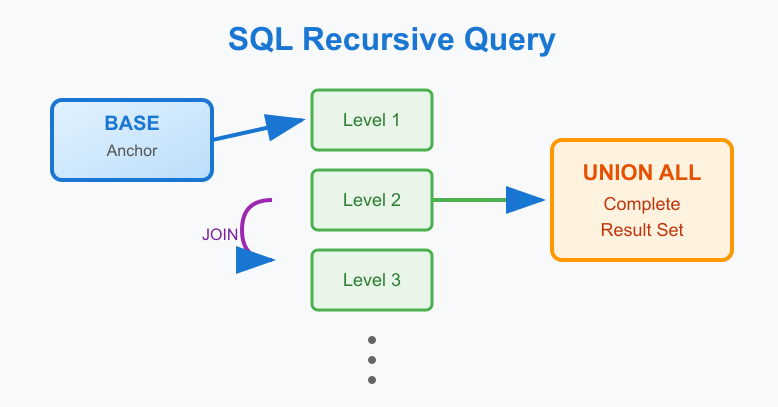
Every recursive query has three essential parts:
1. The Anchor (Base Case)
This is where it all begins - your starting point. Think of it as the root of a tree or the first domino in a chain. Without this, your recursive query would have nowhere to start.
2. The Recursive Step
This is where the magic happens. The query references itself to find the next level of data. It's like saying "now that I found these records, use them to find more records that are related."
3. The Termination Condition
This prevents infinite loops. The recursion naturally stops when the recursive step returns no new rows.
Why Use Recursive Queries?
Traditional Approach Problems
Before recursive queries, handling hierarchical data was painful. You'd either:
- Make multiple round trips to the database (inefficient)
- Store denormalized path data (storage overhead and maintenance nightmare)
- Use stored procedures with loops (database-specific and hard to maintain)
Recursive Query Benefits
- Single Query Execution: Get entire hierarchies in one database round trip
- Dynamic Depth: Works regardless of how deep your hierarchy goes
- Standard SQL: Supported across modern databases
- Performance: When properly indexed, much faster than application-level loops
Common Use Cases
Organizational Charts
Employee management systems where each employee reports to a manager, who reports to their manager, and so on.
Category Trees
E-commerce product categories or content management system folder structures where categories can have subcategories multiple levels deep.
Social Networks
Following relationships, friend networks, or influence mapping where you need to find connections through multiple degrees of separation.
Geographic Hierarchies
Country → State → County → City relationships for location-based queries.
Bill of Materials
Manufacturing scenarios where products are made of components, which are made of sub-components, creating complex nested structures.
Route Planning
Transportation or network routing where you need to find paths between points through intermediate connections.
Performance Considerations
Index Strategy
Recursive queries heavily rely on the relationship columns (like parent_id, manager_id). These MUST be indexed for acceptable performance on large datasets.
Depth Limiting
Most databases allow you to set maximum recursion depth to prevent runaway queries that could impact system performance.
Memory Usage
Deep recursions can consume significant memory. Monitor your queries and consider breaking very deep hierarchies into chunks if needed.
When NOT to Use Recursive Queries
Fixed Small Hierarchies
If your hierarchy never goes beyond 2-3 levels and rarely changes, simple JOINs might be clearer and just as performant.
Frequently Changing Structures
If your hierarchical data changes constantly, consider materialized path patterns or nested set models for better performance.
Very Deep Hierarchies
Hierarchies with hundreds of levels might be better served by specialized graph databases.
Database Support
Recursive CTEs are part of the SQL standard and supported by:
- PostgreSQL
- SQL Server
- Oracle
- MySQL 8.0+
- SQLite
- DB2
The syntax is remarkably consistent across platforms, making your queries portable.
Getting Started
The best way to understand recursive queries is to start simple. Begin with a basic parent-child relationship in your own data. Even if it's just a few levels deep, you'll quickly see the power and elegance of letting SQL handle the traversal for you.
Remember: recursive queries aren't magic - they're just a structured way to let the database do what it does best: efficiently process related data in sets rather than row by row.
A Simple Example to Get Started
Let's look at a basic employee hierarchy to see how recursive queries work in practice:
-- Sample employee table
CREATE TABLE employees
(
    employee_id BIGINT PRIMARY KEY,
    name VARCHAR(100) NOT NULL,
    manager_id BIGINT,

    INDEX idx_employees_manager_id (manager_id),
    FOREIGN KEY (manager_id) REFERENCES employees(employee_id)
);

-- Find all employees under a specific manager
WITH RECURSIVE employee_tree AS
(
    -- Anchor: Start with the target manager
    SELECT
        employee_id
        , name
        , manager_id
        , 0 AS level
    FROM employees
    WHERE employee_id = 100  -- Sarah (CTO)

    UNION ALL

    -- Recursive step: Find direct reports
    SELECT
        e.employee_id
        , e.name
        , e.manager_id
        , et.level + 1
    FROM employees e
    INNER JOIN employee_tree et ON e.manager_id = et.employee_id
)
SELECT
    name
    , level
    , CASE
        WHEN level = 0 THEN 'Manager'
        WHEN level = 1 THEN 'Direct Report'
        ELSE CONCAT('Level ', level, ' Report')
    END AS relationship
FROM employee_tree
ORDER BY level, name;
This query starts with Sarah (the CTO) and finds everyone who reports to her at any level. The recursion automatically stops when there are no more subordinates to find.
Notice how the query has two parts joined by UNION ALL:
- The Anchor: Finds Sarah (our starting point)
- The Recursive Part: Uses the previous results to find the next level down
The magic happens when SQL keeps running the recursive part until no new rows are found.
In the next sections, we'll dive into more practical examples that demonstrate these concepts in action, starting with simple cases and building up to more complex real-world scenarios.
Interested in Some Examples?
- Basics Recursion - Basic Examples
- Advanced Recursion - Advanced examples
Enjoyed this article? Share it with someone who'd love it too.