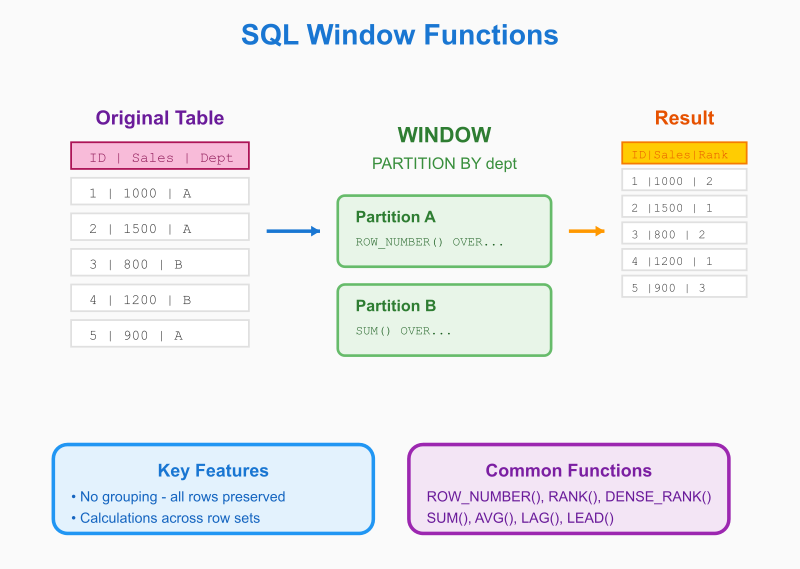
SQL Window Functions
The analytical superpower every data professional needs to master
SQL Window Functions: Basic Examples
Master the fundamentals with practical, real-world scenarios
Now that you understand the key concepts, let's dive into practical examples that you can use immediately. These foundational patterns will solve 80% of your analytical needs and prepare you for advanced techniques.
Getting Started: Basic Syntax Patterns
The Universal Structure
SELECT
    column1,
    column2,
    WINDOW_FUNCTION() OVER (
        PARTITION BY grouping_column
        ORDER BY sorting_column
        [FRAME_SPECIFICATION]
    ) as result_column
FROM table_name;
Essential Function Examples
1. ROW_NUMBER() - Sequential Numbering
Use Case: Number records within groups
-- Rank employees by salary within each department
SELECT
    department,
    employee_name,
    salary,
    ROW_NUMBER() OVER (PARTITION BY department ORDER BY salary DESC) as salary_rank
FROM employees
ORDER BY department, salary_rank;
Result:
department | employee_name | salary | salary_rank
Sales      | Alice         | 75000  | 1
Sales      | Bob           | 65000  | 2
Sales      | Carol         | 60000  | 3
Marketing  | David         | 70000  | 1
Marketing  | Eve           | 55000  | 2
2. RANK() and DENSE_RANK() - Handling Ties
Use Case: Ranking with tied values
-- Student test scores with different ranking methods
SELECT
    student_name,
    score,
    RANK() OVER (ORDER BY score DESC) as rank_with_gaps,
    DENSE_RANK() OVER (ORDER BY score DESC) as rank_no_gaps,
    ROW_NUMBER() OVER (ORDER BY score DESC) as unique_rank
FROM test_scores
ORDER BY score DESC;
Result:
student_name | score | rank_with_gaps | rank_no_gaps | unique_rank
Alice        | 95    | 1              | 1            | 1
Bob          | 90    | 2              | 2            | 2
Charlie      | 90    | 2              | 2            | 3
David        | 85    | 4              | 3            | 4
Eve          | 80    | 5              | 4            | 5
3. SUM() OVER - Running Totals
Use Case: Cumulative calculations
-- Daily sales with running total
SELECT
    sale_date,
    daily_amount,
    SUM(daily_amount) OVER (ORDER BY sale_date) as running_total,
    SUM(daily_amount) OVER () as grand_total
FROM daily_sales
ORDER BY sale_date;
Result:
sale_date  | daily_amount | running_total | grand_total
2024-01-01 | 1000         | 1000          | 6000
2024-01-02 | 1500         | 2500          | 6000
2024-01-03 | 1200         | 3700          | 6000
2024-01-04 | 2300         | 6000          | 6000
4. AVG() OVER - Moving Averages
Use Case: Smoothing data trends
-- 7-day moving average of website traffic
SELECT
    date,
    daily_visitors,
    AVG(daily_visitors) OVER (
        ORDER BY date
        ROWS BETWEEN 6 PRECEDING AND CURRENT ROW
    ) as seven_day_avg,
    AVG(daily_visitors) OVER (
        ORDER BY date
        ROWS BETWEEN 2 PRECEDING AND 2 FOLLOWING
    ) as five_day_centered_avg
FROM website_traffic
ORDER BY date;
5. LAG() and LEAD() - Period Comparisons
Use Case: Compare current vs previous/next values
-- Monthly revenue with growth calculations
SELECT
    month,
    revenue,
    LAG(revenue, 1) OVER (ORDER BY month) as prev_month_revenue,
    LEAD(revenue, 1) OVER (ORDER BY month) as next_month_revenue,
    revenue - LAG(revenue, 1) OVER (ORDER BY month) as month_over_month_change,
    ROUND(
        (revenue - LAG(revenue, 1) OVER (ORDER BY month)) * 100.0 /
        LAG(revenue, 1) OVER (ORDER BY month), 2
    ) as growth_rate_pct
FROM monthly_revenue
ORDER BY month;
Result:
month   | revenue | prev_month | next_month | change | growth_rate_pct
2024-01 | 50000   | NULL       | 55000      | NULL   | NULL
2024-02 | 55000   | 50000      | 52000      | 5000   | 10.00
2024-03 | 52000   | 55000      | 60000      | -3000  | -5.45
2024-04 | 60000   | 52000      | NULL       | 8000   | 15.38
Practical Business Scenarios
Customer Analysis: Order Sequences and Lifetime Value
-- Track customer purchase behavior
SELECT
    customer_id,
    order_date,
    order_amount,
    -- Number each customer's orders
    ROW_NUMBER() OVER (
        PARTITION BY customer_id
        ORDER BY order_date
    ) as order_sequence,
    -- Calculate running total (lifetime value)
    SUM(order_amount) OVER (
        PARTITION BY customer_id
        ORDER BY order_date
        ROWS BETWEEN UNBOUNDED PRECEDING AND CURRENT ROW
    ) as lifetime_value,
    -- Days between orders
    order_date - LAG(order_date) OVER (
        PARTITION BY customer_id
        ORDER BY order_date
    ) as days_since_last_order,
    -- Average order value for this customer
    AVG(order_amount) OVER (PARTITION BY customer_id) as customer_avg_order
FROM orders
WHERE order_date >= '2024-01-01'  -- Filter before windowing for better performance
ORDER BY customer_id, order_date;
Sales Performance: Quotas and Rankings
-- Salesperson performance analysis
SELECT
    salesperson,
    territory,
    quarter,
    sales_amount,
    quota,
    -- Performance metrics
    ROUND(sales_amount * 100.0 / quota, 2) as quota_achievement_pct,
    -- Rankings
    RANK() OVER (ORDER BY sales_amount DESC) as overall_rank,
    RANK() OVER (PARTITION BY territory ORDER BY sales_amount DESC) as territory_rank,
    RANK() OVER (PARTITION BY quarter ORDER BY sales_amount DESC) as quarter_rank,
    -- Percentiles
    PERCENT_RANK() OVER (ORDER BY sales_amount) as performance_percentile,
    -- Territory totals
    SUM(sales_amount) OVER (PARTITION BY territory) as territory_total
FROM quarterly_sales
WHERE year = 2024
ORDER BY sales_amount DESC;
Inventory Management: Stock Level Tracking
-- Track inventory movements with running balance
SELECT
    product_id,
    transaction_date,
    transaction_type,
    quantity,
    -- Running inventory balance
    SUM(
        CASE
            WHEN transaction_type = 'IN' THEN quantity
            ELSE -quantity
        END
    ) OVER (
        PARTITION BY product_id
        ORDER BY transaction_date, transaction_id
        ROWS UNBOUNDED PRECEDING
    ) as current_stock,
    -- Days since last restock
    CASE
        WHEN transaction_type = 'IN' THEN 0
        ELSE transaction_date - LAG(
            CASE WHEN transaction_type = 'IN' THEN transaction_date END
        ) OVER (
            PARTITION BY product_id, transaction_type
            ORDER BY transaction_date
        )
    END as days_since_restock
FROM inventory_transactions
ORDER BY product_id, transaction_date;
Financial Analysis: Account Balances
-- Bank account running balance with transaction analysis
SELECT
    account_id,
    transaction_date,
    description,
    amount,
    -- Running balance
    SUM(amount) OVER (
        PARTITION BY account_id
        ORDER BY transaction_date, transaction_id
        ROWS BETWEEN UNBOUNDED PRECEDING AND CURRENT ROW
    ) as balance,
    -- Transaction sequence
    ROW_NUMBER() OVER (
        PARTITION BY account_id
        ORDER BY transaction_date, transaction_id
    ) as transaction_number,
    -- Largest recent deposit/withdrawal (30-day window for performance)
    MAX(CASE WHEN amount > 0 THEN amount END) OVER (
        PARTITION BY account_id
        ORDER BY transaction_date
        ROWS BETWEEN 29 PRECEDING AND CURRENT ROW
    ) as max_recent_deposit,
    MIN(CASE WHEN amount < 0 THEN amount END) OVER (
        PARTITION BY account_id
        ORDER BY transaction_date
        ROWS BETWEEN 29 PRECEDING AND CURRENT ROW
    ) as largest_recent_withdrawal
FROM bank_transactions
WHERE transaction_date >= CURRENT_DATE - INTERVAL '2 years'  -- Limit dataset size
ORDER BY account_id, transaction_date;
Database-Specific Examples
MySQL: E-commerce Order Analysis
-- Product popularity and revenue analysis
SELECT
    product_name,
    category,
    order_date,
    quantity_sold,
    revenue,
    -- Category rankings
    RANK() OVER (
        PARTITION BY category
        ORDER BY revenue DESC
    ) as category_rank,
    -- Running totals by category
    SUM(revenue) OVER (
        PARTITION BY category
        ORDER BY order_date
        ROWS UNBOUNDED PRECEDING
    ) as category_running_revenue,
    -- Moving average (last 7 days)
    AVG(revenue) OVER (
        PARTITION BY product_name
        ORDER BY order_date
        ROWS BETWEEN 6 PRECEDING AND CURRENT ROW
    ) as seven_day_avg_revenue
FROM product_daily_sales
WHERE order_date >= '2024-01-01'
ORDER BY category, category_rank;
PostgreSQL: User Engagement Analytics
-- Website user session analysis
SELECT
    user_id,
    session_date,
    page_views,
    session_duration_minutes,
    -- Session numbering
    ROW_NUMBER() OVER (
        PARTITION BY user_id
        ORDER BY session_date
    ) as session_number,
    -- Engagement trends
    LAG(page_views) OVER (
        PARTITION BY user_id
        ORDER BY session_date
    ) as prev_session_views,
    -- User totals
    SUM(page_views) OVER (PARTITION BY user_id) as total_user_views,
    AVG(session_duration_minutes) OVER (PARTITION BY user_id) as avg_session_duration,
    -- Identify first-time vs returning users in each session
    CASE
        WHEN ROW_NUMBER() OVER (PARTITION BY user_id ORDER BY session_date) = 1
        THEN 'First Session'
        ELSE 'Returning Session'
    END as session_type
FROM user_sessions
WHERE session_date >= CURRENT_DATE - INTERVAL '30 days'
ORDER BY user_id, session_date;
SQL Server: HR Analytics
-- Employee performance and tenure analysis
SELECT
    employee_id,
    department,
    hire_date,
    current_salary,
    performance_rating,
    -- Tenure calculations
    DATEDIFF(year, hire_date, GETDATE()) as years_with_company,
    -- Department statistics
    AVG(current_salary) OVER (PARTITION BY department) as dept_avg_salary,
    AVG(performance_rating) OVER (PARTITION BY department) as dept_avg_performance,
    -- Rankings
    RANK() OVER (
        PARTITION BY department
        ORDER BY performance_rating DESC, years_with_company DESC
    ) as dept_performance_rank,
    -- Salary percentiles
    PERCENT_RANK() OVER (
        PARTITION BY department
        ORDER BY current_salary
    ) as salary_percentile_in_dept,
    -- Identify high performers
    CASE
        WHEN PERCENT_RANK() OVER (PARTITION BY department ORDER BY performance_rating) >= 0.8
        THEN 'Top Performer'
        WHEN PERCENT_RANK() OVER (PARTITION BY department ORDER BY performance_rating) <= 0.2
        THEN 'Needs Improvement'
        ELSE 'Average Performer'
    END as performance_category
FROM employees
WHERE status = 'Active'
ORDER BY department, dept_performance_rank;
Oracle: Supply Chain Analysis
-- Supplier delivery performance tracking
SELECT
    supplier_name,
    delivery_date,
    expected_date,
    delivery_value,
    -- Delivery performance
    delivery_date - expected_date as days_late,
    CASE
        WHEN delivery_date <= expected_date THEN 'On Time'
        WHEN delivery_date - expected_date <= 2 THEN 'Slightly Late'
        ELSE 'Late'
    END as delivery_status,
    -- Performance metrics over time
    AVG(delivery_date - expected_date) OVER (
        PARTITION BY supplier_name
        ORDER BY delivery_date
        ROWS BETWEEN 11 PRECEDING AND CURRENT ROW
    ) as avg_delay_last_12_deliveries,
    -- On-time delivery rate
    COUNT(CASE WHEN delivery_date <= expected_date THEN 1 END) OVER (
        PARTITION BY supplier_name
        ORDER BY delivery_date
        ROWS BETWEEN 11 PRECEDING AND CURRENT ROW
    ) * 100.0 / 12 as on_time_rate_pct,
    -- Supplier rankings
    DENSE_RANK() OVER (
        ORDER BY
            COUNT(CASE WHEN delivery_date <= expected_date THEN 1 END) OVER (
                PARTITION BY supplier_name
            ) DESC,
            AVG(delivery_date - expected_date) OVER (
                PARTITION BY supplier_name
            ) ASC
    ) as supplier_reliability_rank
FROM supplier_deliveries
WHERE delivery_date >= ADD_MONTHS(SYSDATE, -12)
ORDER BY supplier_name, delivery_date;
Common Beginner Patterns and Solutions
Pattern 1: "Top N in Each Group"
-- Top 3 products by sales in each category
SELECT category, product_name, sales_amount, category_rank
FROM (
    SELECT
        category,
        product_name,
        sales_amount,
        RANK() OVER (PARTITION BY category ORDER BY sales_amount DESC) as category_rank
    FROM product_sales
) ranked
WHERE category_rank <= 3
ORDER BY category, category_rank;
Pattern 2: "Running Totals with Resets"
-- Monthly running totals that reset each year
SELECT
    year,
    month,
    sales,
    SUM(sales) OVER (
        PARTITION BY year
        ORDER BY month
        ROWS BETWEEN UNBOUNDED PRECEDING AND CURRENT ROW
    ) as ytd_sales
FROM monthly_sales
ORDER BY year, month;
Pattern 3: "Percentage of Total"
-- Each sale as percentage of total sales
SELECT
    salesperson,
    sale_amount,
    ROUND(
        sale_amount * 100.0 / SUM(sale_amount) OVER (), 2
    ) as pct_of_total_sales,
    ROUND(
        sale_amount * 100.0 / SUM(sale_amount) OVER (PARTITION BY territory), 2
    ) as pct_of_territory_sales
FROM sales;
Pattern 4: "First/Last Value in Group"
-- Compare each order to customer's first and most recent orders
SELECT
    customer_id,
    order_date,
    order_amount,
    FIRST_VALUE(order_amount) OVER (
        PARTITION BY customer_id
        ORDER BY order_date
        ROWS BETWEEN UNBOUNDED PRECEDING AND CURRENT ROW
    ) as first_order_amount,
    LAST_VALUE(order_amount) OVER (
        PARTITION BY customer_id
        ORDER BY order_date
        ROWS BETWEEN UNBOUNDED PRECEDING AND UNBOUNDED FOLLOWING
    ) as most_recent_order_amount
FROM orders
WHERE order_date >= CURRENT_DATE - INTERVAL '2 years'  -- Limit for performance
ORDER BY customer_id, order_date;
Performance Tips for Beginners
1. Index Your Window Function Columns
-- For: PARTITION BY department ORDER BY salary
CREATE INDEX idx_emp_dept_salary ON employees(department, salary);

-- For: PARTITION BY customer_id ORDER BY order_date
CREATE INDEX idx_orders_customer_date ON orders(customer_id, order_date);
2. Filter Data Before Windowing
-- Good: Filter first, then apply window functions
WITH recent_sales AS (
    SELECT * FROM sales
    WHERE sale_date >= CURRENT_DATE - INTERVAL '1 year'
)
SELECT
    *,
    RANK() OVER (ORDER BY amount DESC) as sales_rank
FROM recent_sales;
3. Use Window Aliases for Readability and Performance
-- Reuse window specifications for better performance
SELECT
    customer_id,
    order_date,
    amount,
    ROW_NUMBER() OVER w as order_sequence,
    SUM(amount) OVER w as running_total,
    AVG(amount) OVER w as running_avg
FROM orders
WINDOW w AS (PARTITION BY customer_id ORDER BY order_date
             ROWS BETWEEN UNBOUNDED PRECEDING AND CURRENT ROW)
WHERE order_date >= CURRENT_DATE - INTERVAL '1 year'  -- Filter first
ORDER BY customer_id, order_date;
Common Mistakes to Avoid
1. Incorrect Frame Boundaries
-- WRONG: This only looks at current row for LAST_VALUE
LAST_VALUE(amount) OVER (ORDER BY date)

-- RIGHT: Specify complete frame
LAST_VALUE(amount) OVER (
    ORDER BY date
    ROWS BETWEEN UNBOUNDED PRECEDING AND UNBOUNDED FOLLOWING
)
2. Forgetting ORDER BY for Running Totals
-- WRONG: No meaningful order for running total
SUM(amount) OVER (PARTITION BY customer_id)

-- RIGHT: Proper chronological order
SUM(amount) OVER (PARTITION BY customer_id ORDER BY order_date)
3. Using Window Functions in WHERE Clauses
-- WRONG: Can't use window functions directly in WHERE
SELECT * FROM sales
WHERE ROW_NUMBER() OVER (ORDER BY amount DESC) <= 10;

-- RIGHT: Use subquery or CTE
WITH ranked_sales AS (
    SELECT *, ROW_NUMBER() OVER (ORDER BY amount DESC) as rank
    FROM sales
)
SELECT * FROM ranked_sales WHERE rank <= 10;
Next Steps: Ready for Intermediate Level
You now have the foundation for solving most analytical problems with window functions. You can:
- Calculate running totals and moving averages
- Rank and segment data within groups
- Compare periods and track trends
- Perform basic customer and sales analysis
Ready for more? The intermediate level covers:
- Complex frame specifications and time-based analysis
- Advanced analytical patterns like cohort analysis
- Sophisticated business scenarios and performance optimization
- Database-specific advanced features
These basic patterns will handle 80% of your analytical needs. Practice with your own data, combine multiple window functions in single queries, and experiment with different frame specifications. Once these patterns become second nature, you'll be ready to tackle the sophisticated analytical challenges in the intermediate guide.
Enjoyed this article? Share it with someone who'd love it too.